VectorBlur2
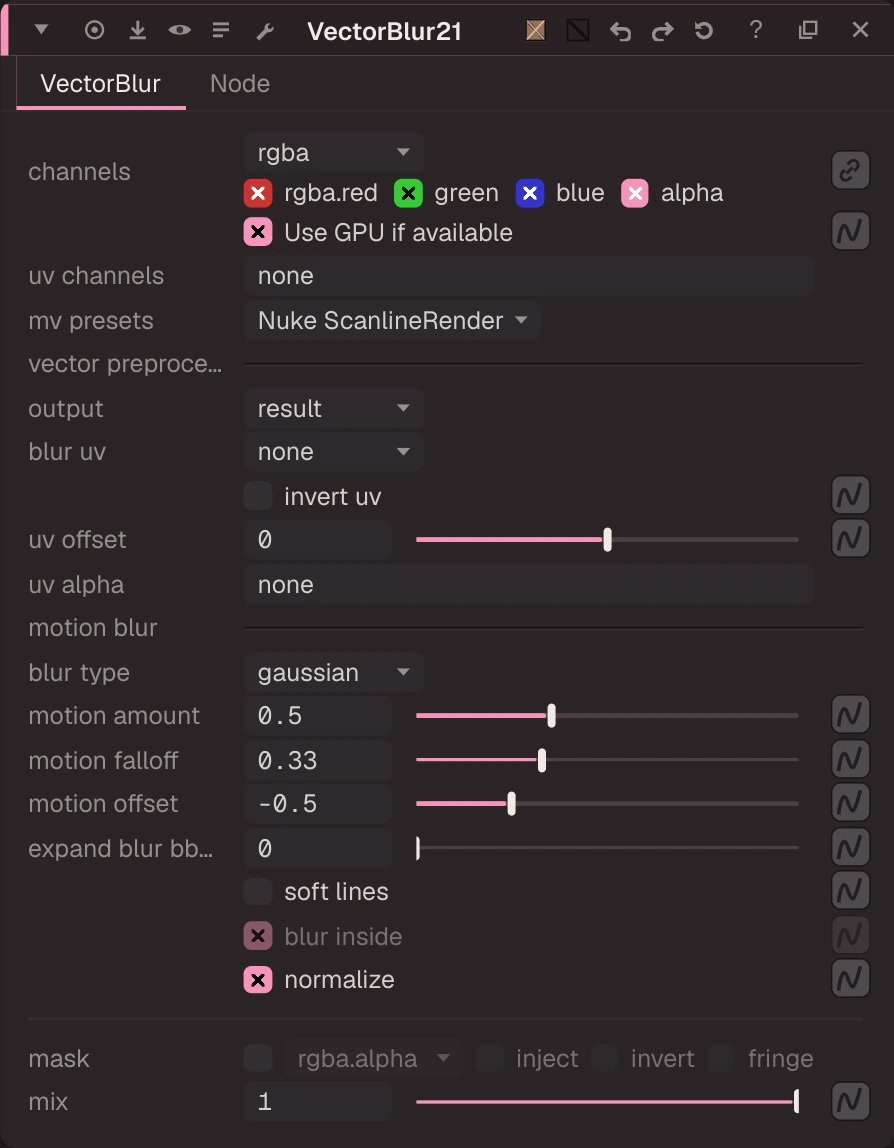
VectorBlur: motion blur along motion vectors — every pixel is smeared along its u / v vector (uv channels) times motion amount (0.5), over the shutter set by motion offset (-0.5 centres it).
VectorBlur: motion blur along motion vectors — every pixel is smeared along its u / v vector (uv channels) times motion amount (0.5), over the shutter set by motion offset (-0.5 centres it). Uniform or gaussian blur type; motion falloff (0.33) softens the ends. The vectors can be offset, inverted, un-premultiplied (uv alpha) or blurred first. Output uvs shows the prepared vectors. Use it after AIVectorGenerator, MotionBlur2D or a render with motion vectors.
| Node | VectorBlur2 |
|---|---|
| Menu | Filter › VectorBlur2 |
| Names in each format | |
| .oink comp (JSON) | "type": "OC_N_vectorblur2" |
| .nk script | VectorBlur2 (how .nk import works) |
| Python | nuke.createNode("VectorBlur2") |
| Assistant (MCP) | create_node(type="VectorBlur2") |
| Tab search | vectorblur2, or its initials vb2 |
Inputs and outputs
| Port | Name | Type |
|---|---|---|
| input 0 | Source | image |
| input 1 | mask | image |
| output 0 | Image | image |
Knobs
Panel tab VectorBlur, in panel order.
| Knob | Label | Type | Default | Range / values | .nk knob | Description |
|---|---|---|---|---|---|---|
channels | channels | menu | rgba | rgba, rgb, alpha, all, none | Layer the op applies to: rgb, rgba, alpha, all, none, <layer> or <layer>.<ch> | |
useGPUIfAvailable | Use GPU if available | bool | true | useGPUIfAvailable | ||
uv | uv channels | text | none | uv | Layer holding the u, v vectors (px per frame), e.g. motion / forward | |
mv_presets | mv presets | menu | Nuke ScanlineRender | Nuke ScanlineRender, PRMan, V-Ray Velocity Clamped, V-Ray Velocity, Arnold | mv_presets | |
output | output | menu | result | result, uvs | output | |
blur_uv | blur uv | menu | none | none, uniform, linear | blur_uv | |
invert_uv | invert uv | bool | false | invert_uv | ||
uv_offset | uv offset | float | 0 | -1 to 1 | uv_offset | |
uv_alpha | uv alpha | text | none | alpha | The channel premultiplied vectors were multiplied by (none = off) | |
blur_type | blur type | menu | gaussian | uniform, gaussian | blur_type | |
scale | motion amount | float | 0.5 | 0 to 4 | scale | |
motion_falloff | motion falloff | float | 0.33 | 0 to 1 | motion_falloff | |
offset | motion offset | float | -0.5 | -1 to 1 | offset | |
grow_bbox | expand blur bbox | float | 0 | 0 to 500 (integer) | grow_bbox | |
soft_lines | soft lines | bool | false | soft_lines | ||
blur_inside | blur inside | bool | true | blur_inside | ||
normalize | normalize | bool | true | normalize | ||
mask_channel | mask | menu | none | none, rgba.alpha, rgba.red, rgba.green, rgba.blue | Mask channel, e.g. rgba.alpha (none = no mask) | |
inject | inject | bool | false | Copy the mask into mask.a for nodes downstream | ||
invert_mask | invert | bool | false | invert_mask | ||
fringe | fringe | bool | false | Only apply the effect at the edges of the mask | ||
mix | mix | float | 1 | 0 to 1 | mix |
Other knobs (Python, .nk and the assistant; not on the panel)
| Knob | Label | Type | Default | Range / values | .nk knob | Description |
|---|---|---|---|---|---|---|
gl_color | Viewer Controls Color | float ×3 | 0, 0, 0 | 0 to 1 | ||
postage_stamp_frame | Static Frame | int | 1 | -2147483648 to 2147483647 | ||
lifetimeStart | Lifetime Start | int | 0 | -2147483648 to 2147483647 | ||
lifetimeEnd | Lifetime End | int | 100 | -2147483648 to 2147483647 | ||
useLifetime | Use Lifetime | boolean | false | |||
cached | Cached | boolean | false | |||
bookmark | Bookmark | boolean | false | |||
dope_sheet | Dope Sheet | boolean | false | |||
clone_group | Clone Group | string | ||||
link_source | Link Source | string | ||||
link_overrides | Link Overrides | string | ||||
split_views | Split Views | string | ||||
unpremult | (Un)premult by | enum | none | none, rgba.alpha | ||
invert_unpremult | invert | boolean | false | (Un)premultiply by 1 - alpha | ||
v_up | V Up (Nuke) | boolean | true |
Knob names in .nk scripts
| .nk knob | Knob here |
|---|---|
alpha | uv_alpha |
Other .nk knobs use the same name here. See .nk import.
Defocus
Blurs the image with a lens disc (bokeh): defocus is the disc's radius in pixels, aspect ratio squeezes it.
ZDefocus
Depth of field from a depth channel — the image is cut into depth layers, each blurred by its distance from the focus plane and laid back over the others from the back to the front.