Oink Download

Alpha 0.1.0-alpha.5 · testers wanted

GPU compositor for VFX.

A node compositor for film and TV that runs every node on the GPU. It opens Nuke .nk scripts and uses the panels, node names and shortcuts Nuke artists already know, with AI roto and mattes, Cycles rendering and a review app in the same download.

Linux, Windows and macOS (Apple Silicon) · free during the alpha

The compositor on an NJR plate: node graph, Viewer, timeline and a Grade's properties. Real app, real footage.
169node types in 13 categories
36AI models that run on your own GPU
309functions in the nuke Python module
32-bitfloat, scene-linear, OpenColorIO

For Nuke artists

Your hands already know it

The panel layout, node names, knobs and keyboard shortcuts follow Nuke 17, so an artist can sit down and work. It opens and saves Nuke .nk scripts, groups and gizmos included, has a nuke Python module for your tools, and runs OFX plugins in their own process so one bad plugin cannot take the session down.

  • .nkopen, import, export, copy and paste
  • Pythonimport nuke, 309 functions
  • Gizmosfrom ~/.nuke and NUKE_PATH
  • OFXplugins, crash-isolated

AI on your machine

Click a person, get a tracked matte

Then fix only the frames it flags. Depth, normals, relighting, motion vectors, upscaling, clean plates and generation are nodes like any other. Models run on your own GPU; frames never go to an online service.

AI nodes: AICleanPlate AIDenoise AIDepth AIKeyer AIMaterials AIMatteRefine AINormals AIRoto AIUpscale AIVectorGenerator GenFill GenVideo

3D

Cycles and USD in the comp

An interactive 3D view with Cycles as the main renderer, live in the Viewer or as a CyclesRender node with GPU denoising. It imports USD, Alembic, FBX, OBJ and glTF. Karma works through your own Houdini.

Cycles and USD rendering ship in the Linux build today; macOS and Windows get them later.

Review

Editorial and review in the box

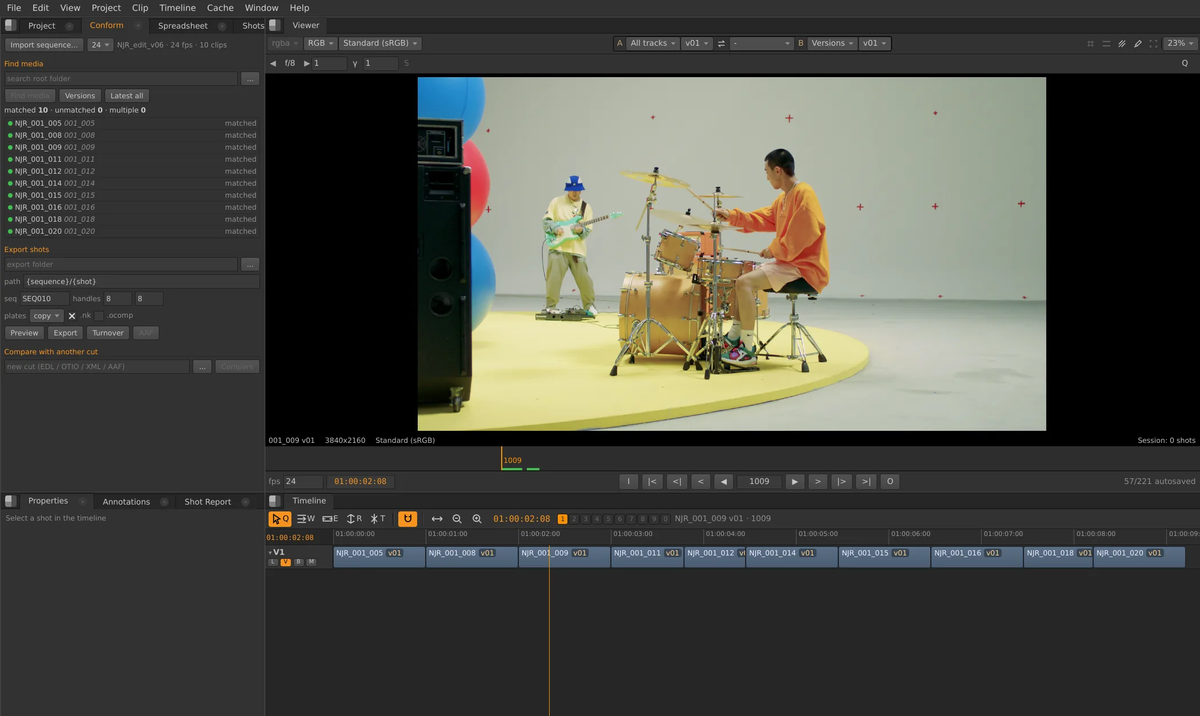
A separate Review app with a multi-track timeline: conform an EDL, OTIO, XML or AAF, compare versions, draw notes and export shots with their comp files. Notes from review show up in the compositor's Viewer.

The Review app: NJR shots conformed on a timeline

Every node is a shader

Each node is a GLSL shader on 32-bit float images, with a C++ core for evaluation and caching. Nothing is clamped until the display.

Renders on the farm you have

A command-line renderer with Nuke-style flags and exit codes, Deadline 10, OpenCue, Flamenco and Open Job Description support, and a built-in network farm.

Agents, with your approval

An AI Assistant and an MCP server let outside agents use the same tools. Every change is proposed first and the artist approves it.

Run by the studio

One policy file turns off everything that reaches the internet, cloud AI, updates and usage reports. Model licences are shown and accepted per user.

Specs

Generated from the code that builds the app, so they match the download.

System

Linux
x86-64, glibc 2.34 or newer; tested on Rocky Linux 9
Windows
Windows 10 or 11, x64. Per-user installer (no admin rights) or a portable .zip
macOS
macOS 14 Sonoma or newer on Apple Silicon
Graphics
OpenGL 4.6 on Linux; DX12 or Metal on Windows and macOS
NVIDIA
Recommended: GPU Cycles (CUDA / OptiX) and the AI tools are built for it
No GPU
Renders on the CPU with the same pixels, slower (--cpu)
Download
Linux 582 MB, macOS 445 MB, Windows 451 MB, Windows .zip 455 MB
AI packages
Downloaded on first use of an AI node, then each model when it is first needed

Image pipeline

Precision
32-bit float RGBA on the GPU, scene-linear; nothing clamped before the display
Nodes
169 node types in 13 categories, 12 of them AI
Colour
OpenColorIO 2.5.2: the bundled config or your own through $OCIO; OCIO transforms run as GPU shaders
Deep
DeepRead, DeepToImage, DeepMerge, DeepHoldout, DeepTransform, DeepCrop, DeepRecolor, DeepFromImage, DeepReformat
Engine
One GLSL shader per node, C++ core for evaluation and per-frame caching

Read

Images
EXR, DPX, CIN, TIF, TIFF, PNG, JPG, JPEG, HDR, TGA, SGI, RGB, PSD, BMP
Movies
MOV, MP4, MXF, AVI, MKV, M4V, WEBM, GIF, WEBP, AVIF, through LGPL FFmpeg in the app's own process
EXR
Multi-part and multi-layer; layers and channels picked per Read
3D
USD, USDA, USDC, USDZ, OBJ, ABC, FBX, PLY, STL, GLB, GLTF

Write

EXR
Half or float; none, Zip (1 or 16 lines), RLE, PIZ, PXR24, B44, B44A, DWAA, DWAB; multi-layer, ACES-compliant option, autocrop, metadata; the bounding box becomes the data window
DPX
8, 10, 12 or 16 bit; fill, byte order and transfer options
TIFF, PNG, JPEG
TIFF 8 / 16 bit / float, PNG 8 / 16 bit, JPEG with quality and sub-sampling
QuickTime, MP4, MKV
ProRes 422 Proxy, LT, 422, HQ, 4444, 4444 XQ; DNxHD; DNxHR; H.264, HEVC and AV1 (software or NVENC); VP9; Motion JPEG; PNG; Animation
MXF
OP1a with DNxHR, DNxHD or ProRes
Web
WebM (VP9 with alpha, AV1), animated GIF, WebP and AVIF
Colour out
Linear to the output colour space on the GPU; movies default to Rec.709 / Gamma 2.4 like Nuke

3D and rendering

Cycles
Built in on Linux: live in the Viewer or as a CyclesRender node, OptiX on NVIDIA, GPU denoising
USD
Stages render through Cycles' USD (Hydra) delegate on Linux
Karma
Through your own Houdini install (husk)
Blender
Not needed. Blender 5.2 LTS, if you add it, brings EEVEE and .blend files

AI

Models
36 models for mattes, tracking, depth, normals, flow, upscaling, frame interpolation, clean plates, relighting and generation
Where
On your own GPU. Cloud AI providers are off unless an administrator allows them
Memory
From 0.5 GB to 22 GB of graphics memory, listed per model below
Licences
Each model's licence is shown and accepted per user. Non-commercial research models sit in an opt-in pack an admin can turn off

Scripting and Nuke

Python
Python 3.13, bundled; import nuke with 309 functions
.nk
Open, import, export, copy and paste: groups, gizmos, user knobs, expressions and Tcl
Gizmos
.gizmo files in ~/.nuke, ~/.opencomp/gizmos or on NUKE_PATH show in the Tab menu
OFX
Plugins run in their own process, so a crash stays in the plugin
Agents
An MCP server and an in-app AI Assistant; changes are proposed and approved by the artist

Pipeline and farm

Command line
Nuke-style flags (-X, -F, -m, --cont) and exit codes; JSON progress for farm tools
Farm managers
Deadline 10 plugin, OpenCue, Flamenco, Open Job Description (AWS Deadline Cloud progress lines)
Network farm
Built in: any machine with the app can be a LAN render worker
Path mapping
Open Job Description path-mapping rules for mixed Linux / Windows / macOS farms
Collect
Copy a comp and every file it uses into one folder or zip

Review

Conform
EDL, OTIO, XML and AAF onto a multi-track timeline
Notes
Compare versions, draw notes, and see them in the compositor's Viewer
Prep Show
Analyses every shot of a show in one pass (key shots, ranges) for planning

Studio controls

Policy file
/etc/opencomp/policy.json (Linux), /Library/Application Support/opencomp/ (macOS), %ProgramData%\opencomp\ (Windows)
Offline
"offline": true turns off every internet request; the app and its AI worker refuse connections at the socket level too
Usage reports
On in alpha and beta (crash reports and anonymous counts, no footage, paths or names), off in stable releases; the policy file can force them off
Licence
Free alpha licence, two machines, 14 days offline between check-ins
Updates
Signed feed (Ed25519). Channels stable, beta and alpha; off, notify (default) or install automatically
Bug reports
Built in the app; logs and a redacted diagnostic bundle you can read before sending

Files

Comps
.oink: plain JSON text, easy to diff and merge; older .ocomp files still open
Logs
~/.cache/opencomp/logs (Linux), ~/Library/Logs/opencomp (macOS), %LOCALAPPDATA%\opencomp\logs (Windows)
Libraries
OpenImageIO 3.1.17, OpenColorIO 2.5.2, FFmpeg 8.1 (LGPL), Electron 28, numpy 2.5.3
All 36 AI models, with licence and graphics memory
ModelJobGPU memoryLicencePack
MapAnythingcamera solve12 GBApache-2.0standard
Wan 2.1 VACE 1.3Bclean plate13 GBApache-2.0standard
Video Depth Anything Smalldepth–Apache-2.0standard
MoGe-2 ViT-Bdepth and normals–MITstandard
MoGe-2 ViT-Ldepth and normals–MIToptional
Grounding DINO Basefind objects by text–Apache-2.0standard
FLUX.2 [dev] 32B fp8mixedgeneration22 GBFLUX [dev] Non-Commercial Licenseresearch pack
FLUX.2 [klein] 4Bgeneration10 GBApache-2.0standard
LTX-2.3 22B distilledgeneration22 GBLTX-2 Community Licenseoptional
Qwen-Image-Edit 20Bgeneration8 GBApache-2.0standard
Wan 2.2 I2V A14Bgeneration20 GBApache-2.0standard
Wan 2.2 TI2V 5Bgeneration20 GBApache-2.0standard
Z-Image Turbogeneration15 GBApache-2.0standard
Cosmos DiffusionRenderer 7Bmaterial passes18.7 GBNVIDIA-Open-Model-Licenseoptional
BiRefNet HR mattingmatte–MITstandard
Robust Video Mattingmatte–GPL-3.0standard
ViTMatte basematte–Apache-2.0standard
ViTMatte smallmatte–Apache-2.0standard
SAM 3matte from text8 GBSAM-Licenseoptional
SAM 3.1matte from text8 GBSAM-Licenseoptional
SEA-RAFT Mmotion vectors–BSD-3-Clausestandard
SEA-RAFT Smotion vectors–BSD-3-Clausestandard
MiniMax-Removerobject removal16 GBCC-BY-NC-4.0 (weights); code: no licence (non-commercial)research pack
TAPNext++point tracking4 GBApache-2.0standard
Cosmos DiffusionRenderer 7Brelighting18.7 GBNVIDIA-Open-Model-Licenseoptional
RIFE 4.26retime–MITstandard
DINOv2 ViT-S/14shot similarity0.5 GBApache-2.0standard
EdgeTAMtracked matte–Apache-2.0standard
EfficientTAM-Stracked matte2 GBApache-2.0standard
EfficientTAM-TItracked matte2 GBApache-2.0standard
SAM 2.1 Hiera Largetracked matte–Apache-2.0standard
Real-ESRGAN x2plusupscale–BSD-3-Clausestandard
Real-ESRGAN x4plusupscale–BSD-3-Clausestandard
SeedVR2 3Bupscale–Apache-2.0standard
Shot-trained upscalerupscale2 GBGPL-3.0standard
MatAnyone 2video matte5 GBS-Lab-License-1.0 (non-commercial)research pack
Command-line render flags
<script>a .oink or .nk script (an .nk is imported first)
-xrender. Accepted for Nuke compatibility; rendering is the default
-F <range>frames: 1-100, 1-100x5 (every 5th), 1,5,10. Repeat -F for more ranges. Default: the script's frame range
-X <Write>render only this Write node. Repeat it (or use Write1,Write2) for several. Default: every enabled Write, in render order
-m <n>number of threads
--contkeep going after a frame fails
-ffull size (the default)
-pproxy: not supported yet (Write nodes have no proxy file path); exits with code 2
-V [level]more output: 1 script loading and the checks, 2 everything, including the engine's own messages
-qquiet: only the progress lines and errors
--view <name>views to render; scripts have one view, main
-iaccepted and ignored (there is no interactive licence)
--gpu [N], --gpu-index Nrender on GPU number N (also sets CUDA_VISIBLE_DEVICES=N)
--cpurender with no GPU, on Mesa's software Vulkan driver (lavapipe). Same pixels, slower
--require-gpufail with exit code 3 if the machine has no working GPU and the engine fell back to a software renderer
--renderer any|gpu|cputhe same choice as one flag, for farm templates: gpu = --require-gpu, cpu = --cpu
--jsonalso print machine-readable OCBG {...} event lines
--no-verifyskip reading each written file back
--openjdalso print Open Job Description progress lines, which AWS Deadline Cloud shows as task progress
--path-map <file>remap file paths in the script (Read, Write...) with Open Job Description path-mapping rules (JSON)
--list-writesprint the script's Write nodes as JSON (name, enabled, order, output path, frame range, dependencies) and exit; for farm submitters
--localizeread the local copies made by Localization (when they match their source by size and time) instead of the network files. Same as Nuke's --use-local-file-cache
--workerrun this machine as a LAN render-farm worker (see LAN render farm)
--collect <script> <dest>copy the comp and every file it uses into a folder (like File > Collect Files). Options: --all-frames, --proxies, --ai-caches, --no-ocio, --zip
--prep-show <edl, otio, folder or json> --out <dir>analyse every shot of a show (see Prep Show). Options: --shots, --chunk i/n, --merge-only
--diag-bundle [--out F.zip]write a redacted diagnostic zip (see Logs and diagnostics)
--mcp-setup [claude-code|claude-desktop]connect Claude Code or Claude Desktop to the running app's MCP server
--versionprint the version

Download

Version 0.1.0-alpha.5, 2026-10-15.

First launch

  • Windows. The build is not signed yet. If SmartScreen says "Windows protected your PC", choose More info, then Run anyway.
  • macOS. The first time, right-click Oink.app and choose Open, then Open again.
  • Linux. Extract the archive and run ./install.sh. It adds the menu entries and the .oink file type.
  • Licence. The alpha needs a free licence: request one below.
  • AI tools. They download their packages and models the first time you use them (several GB).

Releases

  1. 0.1.0-alpha.52026-10-15Linux · macOS · Windows · Windows .zip
  2. 0.1.0-alpha.42026-10-15Linux · macOS · Windows · Windows .zip
  3. 0.1.0-alpha.32026-10-15Linux · macOS · Windows · Windows .zip
SHA-256 checksums
e09236d8d3059c10989853651e674d36d73ffc785434e1b97bbcb57cdaad90e1 oink-0.1.0-alpha.5-linux-x86_64.tar.xz14b9d64d582659fe535d9747061025a6c49cab9b98c6713b84d1e32556cc9edb oink-0.1.0-alpha.5-macos-arm64.dmg8c5d74aae8437997b09c4300e2658668a5b4ffaf8e5340c0dadd7c59a0ff181d oink-0.1.0-alpha.5-windows-x64-setup.exe3c7c2d430012a2314c7f3334a7d20652cd147173d322bbd91770dc356a25d321 oink-0.1.0-alpha.5-windows-x64.zip81eb1ea8aa5d687b03d3b589c512ea44c23a77a9a902e7aa69fc1e2bfa6b75ec sources-linux.tar4c660ff555cf1d22c9479bcd35c1fb70e6cdd52365a84d5ee1830e0f304215de sources-macos-14.tar6febbc62a0e1bea3c4bd00243f7040949c681f75f5a8b7204aeaa04c478a556c sources-windows-2022.tar

Atom feed · versions.json

Be an alpha tester

The alpha is free. Each tester gets a licence for two machines, and it keeps working offline for 14 days between check-ins.

  1. Ask for a licence

    Fill in the form; the licence comes to your email address.

  2. Install and stay current

    The app checks for new builds and offers to install them. Help > Check for Updates... checks right away.

  3. Tell us what broke

    Help > Report a Bug... writes an email to support@megasupersoft.com with a diagnostic bundle you can read before sending.

Alpha and beta builds send crash reports and anonymous usage counts so we can see what breaks; never footage, file paths or names. Turn it off in the app. Studios can force it off with the policy file. Stable releases have it off by default.

Request alpha access

Main system

Questions

Anything else: support@megasupersoft.com.

Is it free?

It is free to download during the alpha. You need a free alpha licence: request one here.

Is it ready for production?

Not yet. This is an alpha: expect bugs, missing pieces and the odd crash. Test it on real shots next to your current pipeline, and keep delivering with what you trust.

When is the beta?

There is no date to announce. The beta comes when clean installs work everywhere, the Nuke shortcut list is complete and the app has no stalls in everyday work.

Is it open source?

No. Oink is proprietary software by MegaSuperSoft. It includes open-source components (FFmpeg, OpenImageIO, OpenColorIO, Cycles, Electron and others); their licences and source are listed with every download.

Can I open my Nuke scripts?

Yes. .nk scripts open: nodes, knobs, expressions, groups and links are translated, and anything that cannot be is listed. You can also export back to .nk and copy and paste between the two.

How is .oink different from .nk?

.oink is Oink's own comp file: plain JSON text, so it diffs and merges cleanly in version control. .nk stays a first-class import and export format.

Do gizmos and OFX plugins work?

Gizmos load from ~/.nuke, ~/.opencomp/gizmos or NUKE_PATH and show in the Tab menu. OFX plugins run in a separate process, so a crashing plugin does not take your session with it.

Does it do deep compositing?

Yes, with 9 deep nodes: DeepRead, DeepToImage, DeepMerge, DeepHoldout, DeepTransform, DeepCrop, DeepRecolor, DeepFromImage, DeepReformat.

Which Python?

Python 3.13, bundled with the app. import nuke gives you 309 functions of Nuke's Python API, enough for most pipeline tools and menus.

Which graphics card do I need?

Any GPU with OpenGL 4.6 on Linux, or DX12 / Metal on Windows and macOS, runs the compositor. GPU Cycles and the AI tools are built for NVIDIA cards.

Will it run on a laptop without NVIDIA?

The compositor will. The AI tools and Cycles fall back to the CPU, which is much slower, and the largest AI models need more graphics memory than most laptops have.

Does it run on Intel Macs?

No. The macOS build is for Apple Silicon and needs macOS 14 or newer.

Which Linux distributions?

x86-64 with glibc 2.34 or newer. It is tested on Rocky Linux 9; other current distributions should work but are not tested yet.

Is Cycles available on Mac and Windows?

Not yet. Cycles and USD rendering ship in the Linux build today; macOS and Windows get them later.

Do I need Blender?

No. Blender 5.2 LTS is optional and only adds EEVEE renders and opening .blend files.

Can I use our studio's OCIO config?

Yes. Point $OCIO at your config, as you would for Nuke; without it, Oink uses its bundled config.

What leaves my machine?

Alpha and beta builds send crash reports and anonymous usage counts: never footage, file paths, comp or shot names. You can turn this off in the app; stable releases have it off. Otherwise the network is used only for things you start: licence check-ins, updates, model downloads and bug reports.

Can a studio run it offline?

Yes. A policy file with "offline": true blocks every internet request, usage reports included. The alpha licence needs a check-in at least every 14 days.

How many machines can I use?

An alpha licence covers two machines, for example a workstation and a laptop.

How do updates work?

The app checks a signed release list and asks before installing (studios can switch this off or make it automatic). Pick the stable, beta or alpha channel; Help > Check for Updates... checks right away.

How do I report a bug?

Help > Report a Bug... writes an email to support@megasupersoft.com with a diagnostic bundle you can read first. File paths, names and tokens are removed from the bundle before you see it.

Where are the logs?

~/.cache/opencomp/logs on Linux, ~/Library/Logs/opencomp on macOS, %LOCALAPPDATA%\opencomp\logs on Windows. Help > Open Log Folder takes you there.

How do I uninstall it?

Windows: Settings > Apps or the Uninstall entry in the Start menu. macOS: drag the app to the Trash. Linux: run ./uninstall.sh in the installed folder. Your settings and caches are kept unless you delete them.

Why does Windows or macOS warn about it?

Alpha builds are not code-signed yet, so the system warns once. The first-launch steps in Downloads get past it.
Try Oink on a real shot

Download the alpha, open a plate, and tell us what got in your way.