ScanlineRender
ScanlineRender node.
| Node | ScanlineRender |
|---|---|
| Menu | 3D › ScanlineRender |
| Names in each format | |
| .oink comp (JSON) | "type": "OC_N_scanlinerender" |
| .nk script | ScanlineRender, also imports ScanlineRender2 (how .nk import works) |
| Python | nuke.createNode("ScanlineRender") |
| Assistant (MCP) | create_node(type="ScanlineRender") |
| Tab search | scanlinerender, or its initials sr |
Inputs and outputs
| Port | Name | Type |
|---|---|---|
| input 0 | bg | image |
| input 1 | obj/scn | scene |
| input 2 | cam | scene |
| output 0 | Image | image |
Knobs
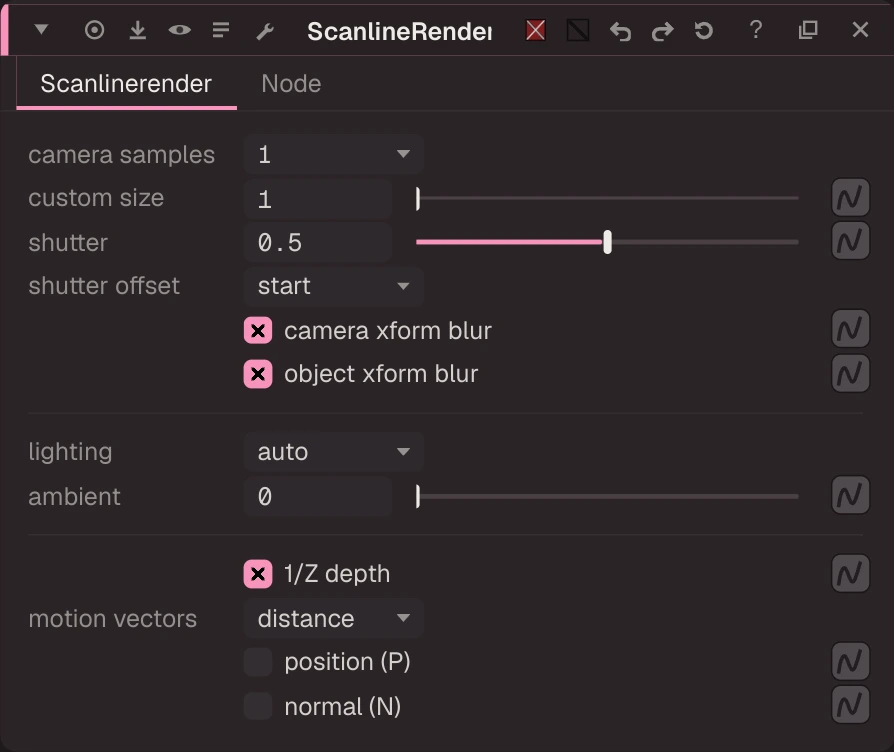
Panel tab Scanlinerender, in panel order.
| Knob | Label | Type | Default | Range / values | .nk knob | Description |
|---|---|---|---|---|---|---|
camera_sample_mode | camera samples | menu | 1 | 1, 4, 9, 16, 32, 64, custom | camera_sample_mode | |
camera_samples_custom | custom size | float | 1 | 1 to 256 (integer) | camera_samples_custom | |
shutter | shutter | float | 0.5 | 0 to 2 | shutter | |
shutteroffset | shutter offset | menu | start | start, centred, end | shutteroffset | |
camera_motion_blur | camera xform blur | bool | true | camera_motion_blur | ||
object_motion_blur | object xform blur | bool | true | object_motion_blur | ||
lighting_enable_mode | lighting | menu | auto | auto, on, off | lighting_enable_mode | |
ambient | ambient | float | 0 | 0 to 1 | ambient | |
one_over_z | 1/Z depth | bool | true | one_over_z | ||
motion_vectors_type | motion vectors | menu | distance | off, distance | motion_vectors_type | |
output_position | position (P) | bool | false | output_position | ||
output_normal | normal (N) | bool | false | output_normal |
Other knobs (Python, .nk and the assistant; not on the panel)
| Knob | Label | Type | Default | Range / values | .nk knob | Description |
|---|---|---|---|---|---|---|
gl_color | Viewer Controls Color | float ×3 | 0, 0, 0 | 0 to 1 | ||
postage_stamp_frame | Static Frame | int | 1 | -2147483648 to 2147483647 | ||
lifetimeStart | Lifetime Start | int | 0 | -2147483648 to 2147483647 | ||
lifetimeEnd | Lifetime End | int | 100 | -2147483648 to 2147483647 | ||
useLifetime | Use Lifetime | boolean | false | |||
cached | Cached | boolean | false | |||
bookmark | Bookmark | boolean | false | |||
dope_sheet | Dope Sheet | boolean | false | |||
clone_group | Clone Group | string | ||||
link_source | Link Source | string | ||||
link_overrides | Link Overrides | string | ||||
split_views | Split Views | string |
Examples
Open these from Help › Examples…, or from the ? menu in this node's Properties panel.
- Relight from rendered normals and depth (
examples/3d/relight_normals.oink): ScanlineRender writes normals (N) and depth; Relight adds a point light using them, the way you relight a CG pass in comp. Move the light's position knob to see the shading follow the shapes. - ScanlineRender: a textured card and a camera (
examples/3d/scanline_card_camera.oink): The classic Nuke 3D setup: a photo textures a Card, the Scene gathers geometry, a Camera looks at it and ScanlineRender draws it over a background. Move the Camera or the Card to see the perspective change.