Cryptomatte
Mattes from Cryptomatte ID layers.
Mattes from Cryptomatte ID layers. Ctrl+click objects in the Viewer (with the panel open) to add them to the Matte List, Ctrl+Shift+click to remove; names come from the manifest in the file. The matte goes to alpha, anti-aliased edges included.
| Node | Cryptomatte |
|---|---|
| Menu | Keyer › Cryptomatte |
| Names in each format | |
| .oink comp (JSON) | "type": "OC_N_cryptomatte" |
| .nk script | Cryptomatte (how .nk import works) |
| Python | nuke.createNode("Cryptomatte") |
| Assistant (MCP) | create_node(type="Cryptomatte") |
| Tab search | cryptomatte |
Usage
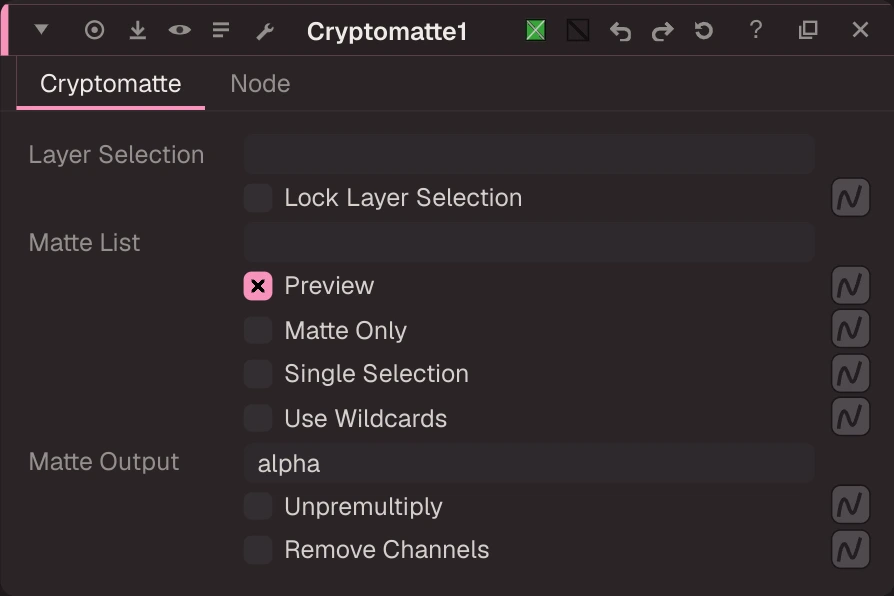
- Layer Selection picks which Cryptomatte (object, material, asset) when the file has several.
- The Matte List takes names separated by commas; with Use Wildcards,
flowerA*picks every match. - Preview shows each object's ID colour with the picked ones bright; Matte Only shows the matte.
Inputs and outputs
| Port | Name | Type |
|---|---|---|
| input 0 | Image | image |
| output 0 | Image | image |
Knobs
Panel tab Cryptomatte, in panel order.
| Knob | Label | Type | Default | Range / values | .nk knob | Description |
|---|---|---|---|---|---|---|
cryptoLayer | Layer Selection | text | cryptoLayer | the Cryptomatte layer name (empty = the first one found). | ||
cryptoLayerLock | Lock Layer Selection | bool | false | cryptoLayerLock | ||
keyedName | Keyed Name | info | keyedName | the last picked name. | ||
matteList | Matte List | text | matteList | the picked names (<0.123> = a raw ID with no manifest entry). | ||
previewEnabled | Preview | bool | true | previewEnabled | ||
matteOnly | Matte Only | bool | false | matteOnly | ||
singleSelection | Single Selection | bool | false | singleSelection | a pick replaces the list. | |
useWildcards | Use Wildcards | bool | false | useWildcards | *, ? and [] in names. | |
matteOutput | Matte Output | text | alpha | matteOutput | alpha, or another channel such as matte.a. | |
unpremultiply | Unpremultiply | bool | false | unpremultiply | divide rgb by the matte. | |
RemoveChannels | Remove Channels | bool | false | RemoveChannels | drop the Cryptomatte layers from the output. |
Other knobs (Python, .nk and the assistant; not on the panel)
| Knob | Label | Type | Default | Range / values | .nk knob | Description |
|---|---|---|---|---|---|---|
gl_color | Viewer Controls Color | float ×3 | 0, 0, 0 | 0 to 1 | ||
postage_stamp_frame | Static Frame | int | 1 | -2147483648 to 2147483647 | ||
lifetimeStart | Lifetime Start | int | 0 | -2147483648 to 2147483647 | ||
lifetimeEnd | Lifetime End | int | 100 | -2147483648 to 2147483647 | ||
useLifetime | Use Lifetime | boolean | false | |||
cached | Cached | boolean | false | |||
bookmark | Bookmark | boolean | false | |||
dope_sheet | Dope Sheet | boolean | false | |||
clone_group | Clone Group | string | ||||
link_source | Link Source | string | ||||
link_overrides | Link Overrides | string | ||||
split_views | Split Views | string |
Examples
Open these from Help › Examples…, or from the ? menu in this node's Properties panel.
- Cryptomatte: matte by name (
examples/cryptomatte/cryptomatte_pick.oink): Psyop's Cryptomatte sample render (BSD-3-Clause). The Cryptomatte node reads the uCryptoObject ID layers and the manifest in the EXR header; its Matte List holds "bunny", so the alpha is the bunny's coverage (anti-aliased edges included) and the preview shows every object's ID colour with the picked one bright. Open the node and Ctrl+click an object in the Viewer to add it, Ctrl+Shift+click to remove it.
Despill
Removes green or blue spill by limiting the screen channel to what the other two allow: their average (balance) or their maximum (limit).
Blur
Blurs the image with a box, triangle, quadratic or gaussian filter; size is the filter's width in pixels (gaussian: its width at half height), separately for width and height.