OCIOColorSpace
Convert between two OCIO colour spaces.
| Node | OCIOColorSpace |
|---|---|
| Menu | Color › OCIOColorSpace |
| Names in each format | |
| .oink comp (JSON) | "type": "OC_N_ociocolorspace" |
| .nk script | OCIOColorSpace (how .nk import works) |
| Python | nuke.createNode("OCIOColorSpace") |
| Assistant (MCP) | create_node(type="OCIOColorSpace") |
| Tab search | ociocolorspace, or its initials ociocs |
Inputs and outputs
| Port | Name | Type |
|---|---|---|
| input 0 | Image | image |
| input 1 | mask | image |
| output 0 | Image | image |
Knobs
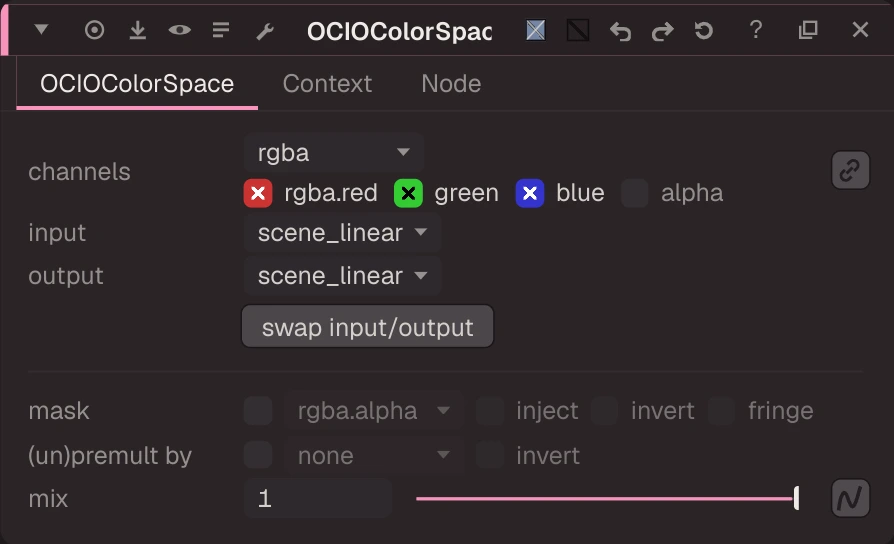
Panel tab OCIOColorSpace, in panel order.
| Knob | Label | Type | Default | Range / values | .nk knob | Description |
|---|---|---|---|---|---|---|
channels | channels | menu | rgb | rgba, rgb, alpha, all, none | Layer the op applies to: rgb, rgba, alpha, all, none, <layer> or <layer>.<ch> | |
in_colorspace | input | menu | scene_linear | scene_linear | in_colorspace | |
out_colorspace | output | menu | scene_linear | scene_linear | out_colorspace | |
swap | swap input/output | button (panel only) | ||||
mask_channel | mask | menu | none | none, rgba.alpha, rgba.red, rgba.green, rgba.blue | Mask channel, e.g. rgba.alpha (none = no mask) | |
inject | inject | bool | false | Copy the mask into mask.a for nodes downstream | ||
invert_mask | invert | bool | false | invert_mask | ||
fringe | fringe | bool | false | Only apply the effect at the edges of the mask | ||
unpremult | (un)premult by | menu | none | none, rgba.alpha | ||
invert_unpremult | invert | bool | false | (Un)premultiply by 1 - alpha | ||
mix | mix | float | 1 | 0 to 1 | mix | |
key1 | key1 | text | key1 | |||
value1 | value1 | text | value1 | |||
key2 | key2 | text | key2 | |||
value2 | value2 | text | value2 | |||
key3 | key3 | text | key3 | |||
value3 | value3 | text | value3 | |||
key4 | key4 | text | key4 | |||
value4 | value4 | text | value4 |
Other knobs (Python, .nk and the assistant; not on the panel)
| Knob | Label | Type | Default | Range / values | .nk knob | Description |
|---|---|---|---|---|---|---|
gl_color | Viewer Controls Color | float ×3 | 0, 0, 0 | 0 to 1 | ||
postage_stamp_frame | Static Frame | int | 1 | -2147483648 to 2147483647 | ||
lifetimeStart | Lifetime Start | int | 0 | -2147483648 to 2147483647 | ||
lifetimeEnd | Lifetime End | int | 100 | -2147483648 to 2147483647 | ||
useLifetime | Use Lifetime | boolean | false | |||
cached | Cached | boolean | false | |||
bookmark | Bookmark | boolean | false | |||
dope_sheet | Dope Sheet | boolean | false | |||
clone_group | Clone Group | string | ||||
link_source | Link Source | string | ||||
link_overrides | Link Overrides | string | ||||
split_views | Split Views | string | ||||
in_colorspace_expr | in (expression) | string | ||||
out_colorspace_expr | out (expression) | string |
Examples
Open these from Help › Examples…, or from the ? menu in this node's Properties panel.
- OCIOColorSpace: ACES2065-1 to scene linear (
examples/color/ocio_aces_to_linear.oink): Carrots.exr is stored with ACES2065-1 (AP0) primaries. The Read is set to raw (no conversion) and the OCIOColorSpace converts AP0 to the working space (Linear Rec.709), which is what the Read's input transform does for you when you set it.