AIMatteRefine
Turns a rough matte (matte input, e.g.
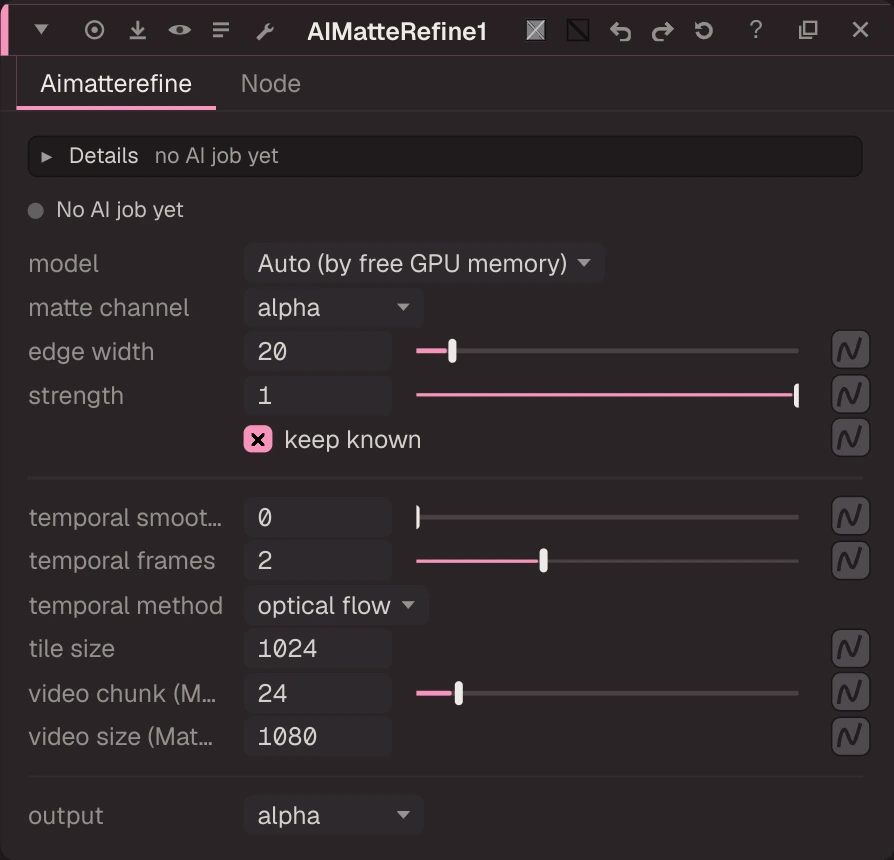
Turns a rough matte (matte input, e.g. AIRoto or a keyer) into a detailed alpha with hair and motion blur. ViTMatte builds a trimap from the rough matte (edge width); BiRefNet HR and RVM (people) work without one. Model Auto picks the best ViTMatte that fits the free GPU memory (never a research model). Temporal smoothing blends neighbour frames warped by optical flow. Runs in the AI worker. MatAnyone 2 (research pack, non-commercial use only: accept its licence in the panel first) is video matting: each chunk of Video Chunk frames starts from the rough matte of its first frame and follows it through time, for temporally stable hair and motion blur.
| Node | AIMatteRefine |
|---|---|
| Menu | AI › AIMatteRefine |
| Names in each format | |
| .oink comp (JSON) | "type": "OC_N_aimatterefine" |
| .nk script | none: written as an Oink node |
| Python | nuke.createNode("OC_N_aimatterefine") |
| Assistant (MCP) | create_node(type="AIMatteRefine") |
| Tab search | aimatterefine, or its initials aimr |
Inputs and outputs
| Port | Name | Type |
|---|---|---|
| input 0 | Image | image |
| input 1 | matte | image |
| output 0 | Image | image |
Knobs
Panel tab Aimatterefine, in panel order.
| Knob | Label | Type | Default | Range / values | .nk knob | Description |
|---|---|---|---|---|---|---|
model | model | menu | AUTO | AUTO (Auto (by free GPU memory)), VITMATTE_BASE (ViTMatte base), VITMATTE_SMALL (ViTMatte small), BIREFNET (BiRefNet HR), RVM (RVM (humans)), MATANYONE2 (MatAnyone 2 (research pack, non-commercial)) | ||
matte_channel | matte channel | menu | alpha | alpha, red, green, blue | Channel of the matte input holding the rough alpha | |
edge_width | edge width | float | 20 | 1 to 200 | Width of the band around the rough edge the model may change (px) | |
strength | strength | float | 1 | 0 to 1 | 0 = rough matte, 1 = fully refined (inside the edge band) | |
keep_known | keep known | bool | true | BiRefNet / RVM: keep the rough matte's solid inside and outside | ||
temporal | temporal smoothing | float | 0 | 0 to 1 | Blend with neighbouring frames' refined alpha (0 = off) | |
temporal_radius | temporal frames | float | 2 | 1 to 4 (integer) | Neighbours on each side | |
temporal_method | temporal method | menu | flow | flow (optical flow), blend | ||
tile_size | tile size | float | 1024 | 0 to 4096 (integer) | ViTMatte tile size in px (0 = whole frame at once) | |
video_chunk | video chunk (MatAnyone 2) | float | 24 | 2 to 200 (integer) | MatAnyone 2: frames per chunk; each chunk starts from the rough matte of its first frame (project range aligned) | |
video_size | video size (MatAnyone 2) | float | 1080 | 256 to 4096 (integer) | MatAnyone 2: shortest side it works at (bigger plates are resized inside; more = finer hair, more VRAM) | |
output | output | menu | alpha | alpha, premult (premultiplied), unmix (unmixed fg), matte |
Other knobs (Python, .nk and the assistant; not on the panel)
| Knob | Label | Type | Default | Range / values | .nk knob | Description |
|---|---|---|---|---|---|---|
gl_color | Viewer Controls Color | float ×3 | 0, 0, 0 | 0 to 1 | ||
postage_stamp_frame | Static Frame | int | 1 | -2147483648 to 2147483647 | ||
lifetimeStart | Lifetime Start | int | 0 | -2147483648 to 2147483647 | ||
lifetimeEnd | Lifetime End | int | 100 | -2147483648 to 2147483647 | ||
useLifetime | Use Lifetime | boolean | false | |||
cached | Cached | boolean | false | |||
bookmark | Bookmark | boolean | false | |||
dope_sheet | Dope Sheet | boolean | false | |||
clone_group | Clone Group | string | ||||
link_source | Link Source | string | ||||
link_overrides | Link Overrides | string | ||||
split_views | Split Views | string |
Examples
Open these from Help › Examples…, or from the ? menu in this node's Properties panel.
- AIMatteRefine: hair-quality edges from a rough matte (
examples/ai/aimatterefine_edges.oink): A rough matte (the CandleGlass alpha, eroded by a Blur) goes into the matte input; AIMatteRefine (ViTMatte) rebuilds the soft edge from the plate.