ColorCorrect
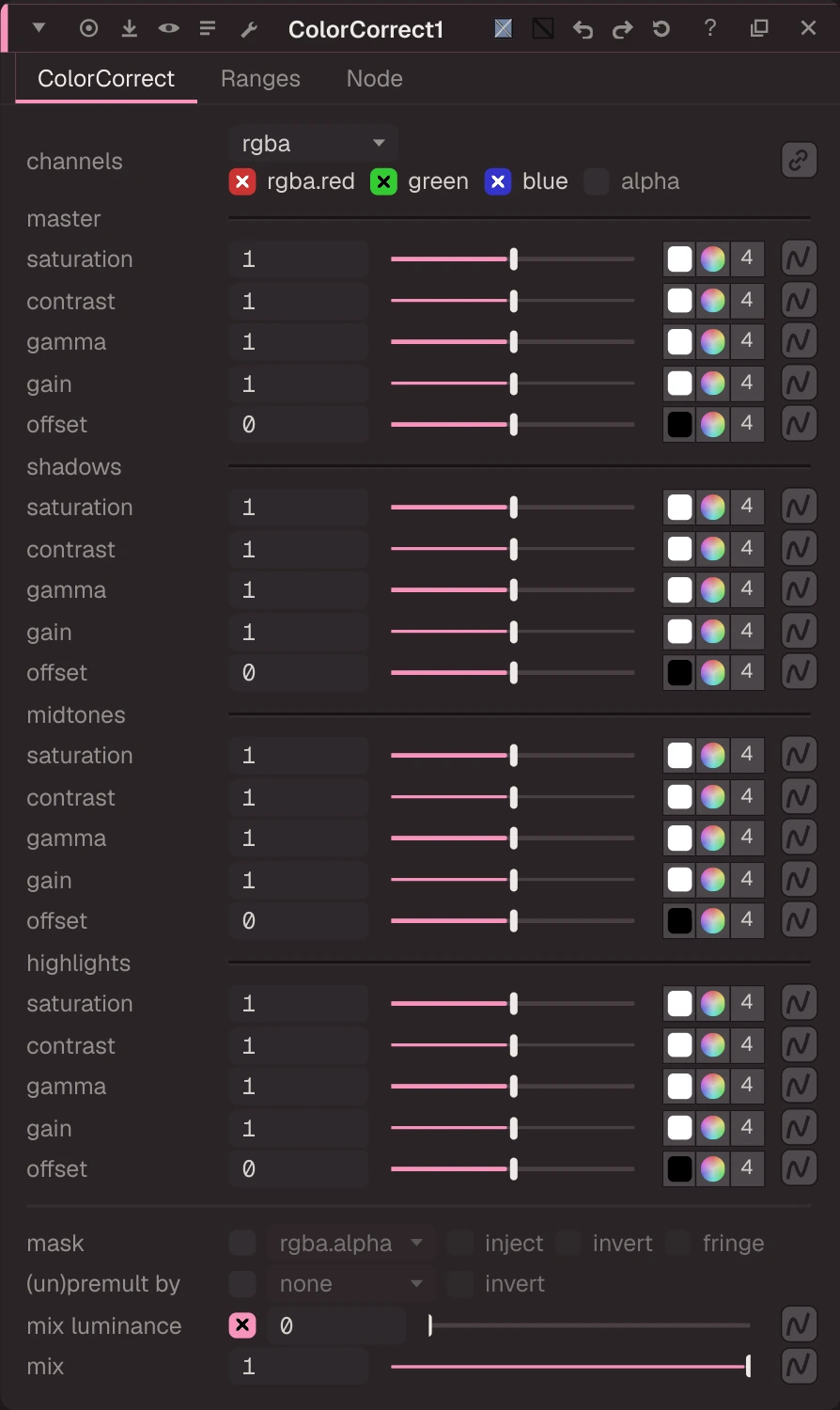
Saturation, contrast, gamma, gain and offset, separately for shadows, midtones and highlights.
| Node | ColorCorrect |
|---|---|
| Menu | Color › ColorCorrect |
| Names in each format | |
| .oink comp (JSON) | "type": "OC_N_colorcorrect" |
| .nk script | ColorCorrect (how .nk import works) |
| Python | nuke.createNode("ColorCorrect") |
| Assistant (MCP) | create_node(type="ColorCorrect") |
| Tab search | colorcorrect, or its initials cc |
Inputs and outputs
| Port | Name | Type |
|---|---|---|
| input 0 | Image | image |
| input 1 | mask | image |
| output 0 | Image | image |
Knobs
Panel tab ColorCorrect, in panel order.
| Knob | Label | Type | Default | Range / values | .nk knob | Description |
|---|---|---|---|---|---|---|
channels | channels | menu | rgb | rgba, rgb, alpha, all, none | Layer the op applies to: rgb, rgba, alpha, all, none, <layer> or <layer>.<ch> | |
saturation | saturation | colour ×4 | 1, 1, 1, 1 | 0 to 4 | saturation | |
contrast | contrast | colour ×4 | 1, 1, 1, 1 | 0 to 4 | contrast | |
gamma | gamma | colour ×4 | 1, 1, 1, 1 | 0.2 to 5 | gamma | |
gain | gain | colour ×4 | 1, 1, 1, 1 | 0 to 4 | gain | |
offset | offset | colour ×4 | 0, 0, 0, 0 | -1 to 1 | offset | |
shadows_saturation | saturation | colour ×4 | 1, 1, 1, 1 | 0 to 4 | shadows.saturation | |
shadows_contrast | contrast | colour ×4 | 1, 1, 1, 1 | 0 to 4 | shadows.contrast | |
shadows_gamma | gamma | colour ×4 | 1, 1, 1, 1 | 0.2 to 5 | shadows.gamma | |
shadows_gain | gain | colour ×4 | 1, 1, 1, 1 | 0 to 4 | shadows.gain | |
shadows_offset | offset | colour ×4 | 0, 0, 0, 0 | -1 to 1 | shadows.offset | |
midtones_saturation | saturation | colour ×4 | 1, 1, 1, 1 | 0 to 4 | midtones.saturation | |
midtones_contrast | contrast | colour ×4 | 1, 1, 1, 1 | 0 to 4 | midtones.contrast | |
midtones_gamma | gamma | colour ×4 | 1, 1, 1, 1 | 0.2 to 5 | midtones.gamma | |
midtones_gain | gain | colour ×4 | 1, 1, 1, 1 | 0 to 4 | midtones.gain | |
midtones_offset | offset | colour ×4 | 0, 0, 0, 0 | -1 to 1 | midtones.offset | |
highlights_saturation | saturation | colour ×4 | 1, 1, 1, 1 | 0 to 4 | highlights.saturation | |
highlights_contrast | contrast | colour ×4 | 1, 1, 1, 1 | 0 to 4 | highlights.contrast | |
highlights_gamma | gamma | colour ×4 | 1, 1, 1, 1 | 0.2 to 5 | highlights.gamma | |
highlights_gain | gain | colour ×4 | 1, 1, 1, 1 | 0 to 4 | highlights.gain | |
highlights_offset | offset | colour ×4 | 0, 0, 0, 0 | -1 to 1 | highlights.offset | |
mask_channel | mask | menu | none | none, rgba.alpha, rgba.red, rgba.green, rgba.blue | Mask channel, e.g. rgba.alpha (none = no mask) | |
inject | inject | bool | false | Copy the mask into mask.a for nodes downstream | ||
invert_mask | invert | bool | false | invert_mask | ||
fringe | fringe | bool | false | Only apply the effect at the edges of the mask | ||
unpremult | (un)premult by | menu | none | none, rgba.alpha | ||
invert_unpremult | invert | bool | false | (Un)premultiply by 1 - alpha | ||
enable_mix_luminance | mix luminance | bool | true | enable_mix_luminance | ||
mix_luminance | mix luminance | float | 0 | 0 to 1 | mix_luminance | |
mix | mix | float | 1 | 0 to 1 | mix | |
test | test | bool | false | test | ||
lookup | lookup | curves | {shadow {curve 1 s0 x0.09 0 s0} midtone {1-shadow-highlight} highlight {curve x0.5 0 s0 x1 1 s0}} |
Other knobs (Python, .nk and the assistant; not on the panel)
| Knob | Label | Type | Default | Range / values | .nk knob | Description |
|---|---|---|---|---|---|---|
gl_color | Viewer Controls Color | float ×3 | 0, 0, 0 | 0 to 1 | ||
postage_stamp_frame | Static Frame | int | 1 | -2147483648 to 2147483647 | ||
lifetimeStart | Lifetime Start | int | 0 | -2147483648 to 2147483647 | ||
lifetimeEnd | Lifetime End | int | 100 | -2147483648 to 2147483647 | ||
useLifetime | Use Lifetime | boolean | false | |||
cached | Cached | boolean | false | |||
bookmark | Bookmark | boolean | false | |||
dope_sheet | Dope Sheet | boolean | false | |||
clone_group | Clone Group | string | ||||
link_source | Link Source | string | ||||
link_overrides | Link Overrides | string | ||||
split_views | Split Views | string |
Knob names in .nk scripts
| .nk knob | Knob here |
|---|---|
shadows.saturation | shadows_saturation |
shadows.contrast | shadows_contrast |
shadows.gamma | shadows_gamma |
shadows.gain | shadows_gain |
shadows.offset | shadows_offset |
midtones.saturation | midtones_saturation |
midtones.contrast | midtones_contrast |
midtones.gamma | midtones_gamma |
midtones.gain | midtones_gain |
midtones.offset | midtones_offset |
highlights.saturation | highlights_saturation |
highlights.contrast | highlights_contrast |
highlights.gamma | highlights_gamma |
highlights.gain | highlights_gain |
highlights.offset | highlights_offset |
Other .nk knobs use the same name here. See .nk import.
Examples
Open these from Help › Examples…, or from the ? menu in this node's Properties panel.
- ColorCorrect by tonal range (
examples/color/colorcorrect_ranges.oink): ColorCorrect adjusts shadows, midtones and highlights separately. Here the shadows get cooler and less saturated, the highlights warmer, and the whole image a bit more contrast.