Read
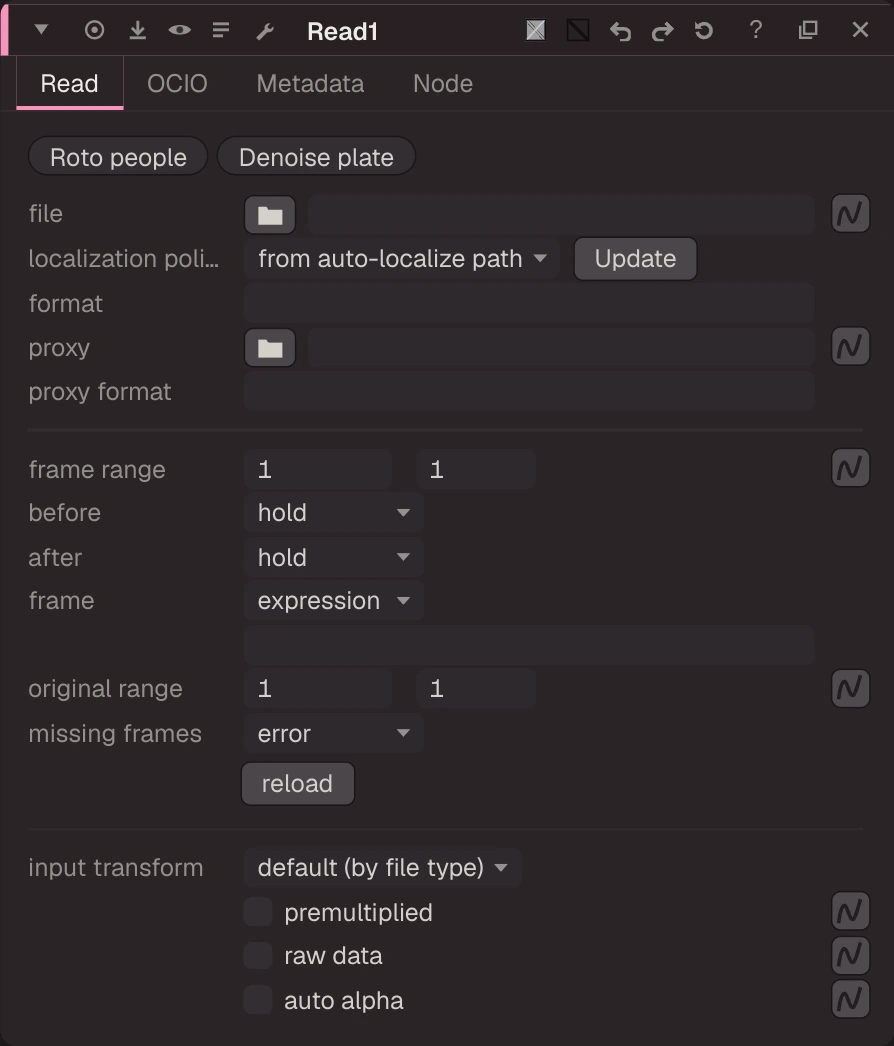
Reads images from disk.
Reads images from disk. Sequences use #### or %04d in the file name (a %04d path from a .nk file is kept as written and expanded when read). Movies (mov, mp4, mxf, mkv, webm, avi, gif and more) are decoded inside the app with LGPL FFmpeg libraries. Playback reads ahead of the playhead, so frames are ready before you reach them. before / after set what shows outside the frame range (hold by default); Missing Frames chooses error, black, checkerboard or nearest frame. format and proxy format, the OCIO context tab and the EXR options (edge pixels, offset negative display window, do not attach prefix, channel filters) match the standard Read.
| Node | Read |
|---|---|
| Menu | Input/Output › Read |
| Names in each format | |
| .oink comp (JSON) | "type": "OC_N_read" |
| .nk script | Read (how .nk import works) |
| Python | nuke.createNode("Read") |
| Assistant (MCP) | create_node(type="Read") |
| Tab search | read |
Localization
A Read can work from a local copy of its files instead of the network share (localization). Set localization policy: on always copies the files, from auto-localize path copies them only when they are under a folder listed in Preferences › Performance › Localization › auto-localize from, on demand copies them only when you click Update, off never copies them. Only the frames in the Read's frame range are copied, starting at the current frame. A bar at the top of the thumbnail shows the state: amber while copying, green when every frame is local, red when the source changed since it was copied (striped red: the Read is reading the source files meanwhile). See Localization.
Inputs and outputs
| Port | Name | Type |
|---|---|---|
| output 0 | Image | image |
Knobs
Panel tab Read, in panel order.
| Knob | Label | Type | Default | Range / values | .nk knob | Description |
|---|---|---|---|---|---|---|
filepath | file | file | file | File path. Use #### for frame padding in sequences | ||
localization_policy | localization policy | menu | fromAutoLocalizePath | on, fromAutoLocalizePath (from auto-localize path), onDemand (on demand), off | localizationPolicy | when this Read's files are copied to the local cache (.nk localizationPolicy). New Reads take the Preferences' default. |
updateLocalization | Update | button (panel only) | Update: copy the files now, or copy again the ones whose source changed (the only way an on demand Read is localized). | |||
format | format | text | format | Nuke format text 'w h [x y r t] [pixel aspect] [name]'; empty = the file's own (header). Another size sets the display window; the pixels are not scaled | ||
proxy | proxy | file | proxy | File used instead when the viewer is in proxy mode | ||
proxy_format | proxy format | text | proxy_format | Format of the proxy file (Nuke proxy_format; kept for .nk) | ||
first_frame | frame range | float | 1 | -100000 to 100000 (integer) | first | First frame of sequence |
last_frame | to | float | 1 | -100000 to 100000 (integer) | last | Last frame of sequence |
before | before | menu | HOLD | HOLD (hold), LOOP (loop), BOUNCE (bounce), BLACK (black) | before | What to show before the first frame |
after | after | menu | HOLD | HOLD (hold), LOOP (loop), BOUNCE (bounce), BLACK (black) | after | What to show after the last frame |
frame_mode | frame | menu | EXPRESSION | EXPRESSION (expression), START_AT (start at), OFFSET (offset) | frame_mode | |
frame | text | frame | Expression (e.g. frame+10, frame*2), start frame, or offset; empty = none | |||
orig_first | original range | float | 1 | -100000 to 100000 (integer) | origfirst | First frame found on disk |
orig_last | to | float | 1 | -100000 to 100000 (integer) | origlast | Last frame found on disk |
on_error | missing frames | menu | ERROR | ERROR (error), BLACK (black), CHECKERBOARD (checkerboard), NEAREST (nearest frame) | on_error | |
reload | reload | button (panel only) | ||||
colorspace | input transform | menu | default | default (default (by file type)) | colorspace | OCIO colorspace of the file; converted to scene_linear. 'default' = by file type (float=linear, log=compositing_log, 8/16-bit=sRGB) |
premultiplied | premultiplied | bool | false | premultiplied | File is premultiplied: unpremultiply around the colorspace conversion | |
raw | raw data | bool | false | raw | No colorspace conversion | |
auto_alpha | auto alpha | bool | false | auto_alpha | Set alpha to 1 when the file has none (otherwise 0, like Nuke) | |
key1 | key1 | text | key1 | |||
value1 | value1 | text | value1 | |||
key2 | key2 | text | key2 | |||
value2 | value2 | text | value2 | |||
key3 | key3 | text | key3 | |||
value3 | value3 | text | value3 | |||
key4 | key4 | text | key4 | |||
value4 | value4 | text | value4 |
Other knobs (Python, .nk and the assistant; not on the panel)
| Knob | Label | Type | Default | Range / values | .nk knob | Description |
|---|---|---|---|---|---|---|
gl_color | Viewer Controls Color | float ×3 | 0, 0, 0 | 0 to 1 | ||
postage_stamp_frame | Static Frame | int | 1 | -2147483648 to 2147483647 | ||
lifetimeStart | Lifetime Start | int | 0 | -2147483648 to 2147483647 | ||
lifetimeEnd | Lifetime End | int | 100 | -2147483648 to 2147483647 | ||
useLifetime | Use Lifetime | boolean | false | |||
cached | Cached | boolean | false | |||
bookmark | Bookmark | boolean | false | |||
dope_sheet | Dope Sheet | boolean | false | |||
clone_group | Clone Group | string | ||||
link_source | Link Source | string | ||||
link_overrides | Link Overrides | string | ||||
split_views | Split Views | string | ||||
is_sequence | Sequence | boolean | false | Treat as image sequence | ||
mov64_ycbcr_matrix | YCbCr Matrix | enum | default | default, rec601, rec709, rec2020 | mov64_ycbcr_matrix | Matrix that turns the movie's YCbCr into RGB |
mov64_decode_video_levels | Data Range | enum | default | default, video, full | mov64_decode_video_levels | Code value range of the movie's YCbCr |
mov64_decoder | Decoder | enum | auto | auto, cpu, nvdec | Movie decoder (not in Nuke: ours) | |
origset | Original Range Set | boolean | false | origset | Nuke origset (the original range was read from disk) | |
reload_serial | Reload | int | 0 | -2147483648 to 2147483647 | Bumped by the reload button: every cache of this Read is re-read from disk | |
offset_negative_display_window | Offset Negative Display Window | boolean | true | offset_negative_display_window | A display window starting at a negative x: on = shift the image so it starts at x 0; off = shrink the format on both sides by that amount (overscan) | |
noprefix | Do Not Attach Prefix | boolean | false | noprefix | Metadata keys as in the file, without the exr/ prefix | |
edge_pixels | Edge Pixels | enum | PLATE_DETECT | PLATE_DETECT, EDGE_DETECT, REPEAT, BLACK | edge_pixels | Pixels outside the data window (bbox) |
channel_filter_language | Channel Filter | enum | glob | glob, regex | channel_filter_language | |
channel_filters | Filter Masks | string | * | channel_filters | EXR channel names to load, left to right: 'pattern' / +pattern on, -pattern off, #pattern ignored (e.g. '* -diffuse +rock_diffuse*'). rgba and depth always lo | |
disable_extra_channels | Disable Extra Channels | boolean | false | disable_extra_channels | Load only RGBA and Z (depth) | |
pre_error_on_channel_limit | Pre-Error If Channel Limit Exceeded | boolean | true | pre_error_on_channel_limit | Nuke's 1024-channel limit (Oink has none: kept for .nk) | |
mov64_first_track_only | First Track Only | boolean | true | mov64_first_track_only | Only the first video track (Oink reads the first track: kept for .nk) | |
mov64_no_prefix | Do Not Attach Prefix | boolean | false | mov64_no_prefix | Metadata keys without the quicktime/ prefix (container keys keep it) | |
mov64_match_meta_format | Match Key Format | boolean | true | mov64_match_meta_format | Clean metadata keys into Nuke's key format | |
show_thumbnail | Show Thumbnail | boolean | false | Display a preview thumbnail of the image |
Knob names in .nk scripts
| .nk knob | Knob here |
|---|---|
file | filepath |
first | first_frame |
last | last_frame |
origfirst | orig_first |
origlast | orig_last |
localizationPolicy | localization_policy |
cacheLocal | localization_policy |
Other .nk knobs use the same name here. See .nk import.
Examples
Open these from Help › Examples…, or from the ? menu in this node's Properties panel.
- OCIOColorSpace: ACES2065-1 to scene linear (
examples/color/ocio_aces_to_linear.oink): Carrots.exr is stored with ACES2065-1 (AP0) primaries. The Read is set to raw (no conversion) and the OCIOColorSpace converts AP0 to the working space (Linear Rec.709), which is what the Read's input transform does for you when you set it. - Read input transform: ACES2065-1 frame (
examples/color/read_aces_input_transform.oink): One 4K frame of Netflix's Sparks (CC BY 4.0, Netflix Open Content): scene-linear ACES2065-1 with no chromaticities in the file, so the Read's input transform is set to ACES2065-1 by hand. The Reformat brings the 4096x2160 frame down to HD for a light comp. - Cryptomatte layers (
examples/cryptomatte/cryptomatte_layers.oink): Psyop's Cryptomatte sample render (BSD-3-Clause): the file carries a preview layer (uCryptoObject, one flat colour per object) and the ID/coverage rank layers uCryptoObject00-02. The Shuffle shows the preview layer; switch its input layer to uCryptoObject00 to see raw IDs (red, blue) and coverage (green, alpha). - Data window outside the display window (
examples/io/read_data_window.oink): openexr-images DisplayWindow/t08.exr: 400x300 pixels whose data window starts at (30, 40) inside a 501x401 display window. The Read keeps the whole data window as the bounding box; the Crop cuts it back to the format, like Nuke. - Read an EXR (
examples/io/read_exr_basic.oink): A single scanline EXR photo (openexr-images ScanLines/Desk.exr) read into scene-linear and shown in the Viewer. Start here: open the Read's properties to see the file, frame range and colour knobs. - Bright values, NaN and inf (
examples/io/read_hdr_nan_inf.oink): TestImages/BrightRingsNanInf.exr has rings brighter than 1000 and a few NaN / inf pixels in the middle. Oink never clamps in the pipeline, so they reach the Viewer as they are. The Clamp limits the rings to 0-1; the NaN pixels stay NaN (look at them with the Viewer's pixel readout), which is why you fix NaNs at the source before a blur spreads them. - Multi-part stereo EXR sequence (
examples/io/read_multipart_stereo.oink): The Beachball sequence stored as EXR 2.0 multi-part files: one layer per part, left and right views, and a different data window per part. The Shuffle pulls the forward motion vectors into rgb.