Kronos
Retimes a clip with motion vectors.
Retimes a clip with motion vectors. Timing: Output Speed, Input Speed or an animated Frame curve. Method: Frame (nearest), Blend, Motion (the input's motion / occlusion layers, else AI optical flow) or RIFE 4.26 (AI worker, ours). Shutter samples / time add motion blur. All layers are retimed; float values and highlights are kept. Generating flow never freezes the app: the frame shows when the vectors are ready.
| Node | Kronos |
|---|---|
| Menu | Time › Kronos |
| Names in each format | |
| .oink comp (JSON) | "type": "OC_N_retime" |
| .nk script | Kronos (how .nk import works) |
| Python | nuke.createNode("Kronos") |
| Assistant (MCP) | create_node(type="Kronos") |
| Tab search | kronos |
Inputs and outputs
| Port | Name | Type |
|---|---|---|
| input 0 | Source | image |
| output 0 | Image | image |
Knobs
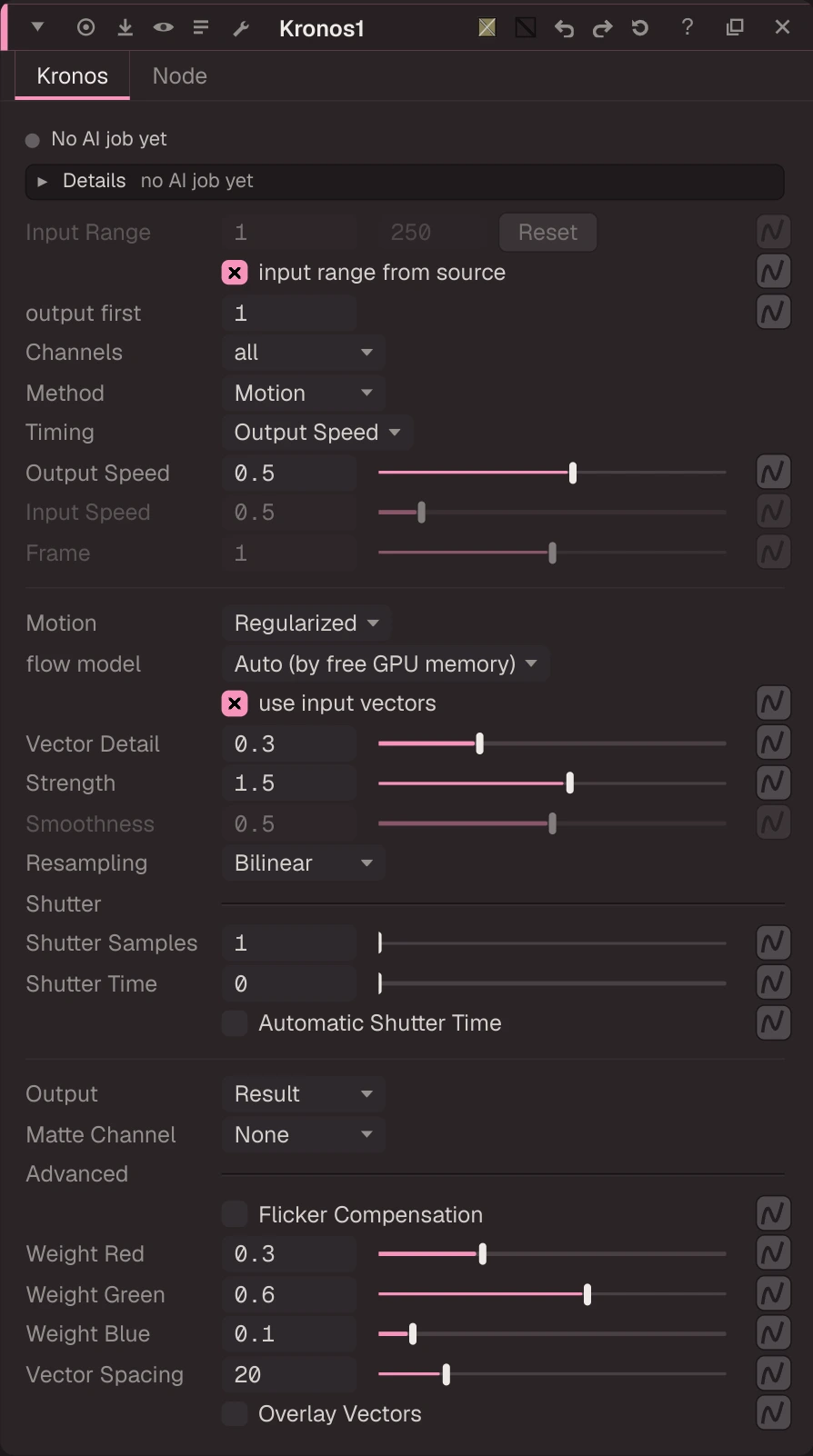
Panel tab Kronos, in panel order.
| Knob | Label | Type | Default | Range / values | .nk knob | Description |
|---|---|---|---|---|---|---|
input_first | Input Range | float | 1 | -100000 to 100000 (integer) | ||
input_last | to | float | 100 | -100000 to 100000 (integer) | ||
reset_input_range | Reset | button (panel only) | ||||
use_input_range | input range from source | bool | true | Input first/last and output first = the upstream clip's frame range | ||
output_first | output first | float | 1 | -100000 to 100000 (integer) | Output frame of the input's first frame (Nuke: the input first) | |
channels | Channels | menu | all | all, rgba | retimedChannels | |
method | Method | menu | motion | nearest (Frame), blend (Blend), motion (Motion), rife (RIFE) | interpolation | |
timing | Timing | menu | speed | speed (Output Speed), input_speed (Input Speed), frame (Frame) | timing2 | |
speed | Output Speed | float | 0.5 | -4 to 4 | timingOutputSpeed | |
input_speed | Input Speed | float | 0.5 | 0.001 to 4 | timingInputSpeed | |
source_frame | Frame | float | 1 | -100000 to 100000 | timingFrame2 | |
motion_estimation | Motion | menu | Regularized | Regularized, Local | motionEstimation | |
flow_model | flow model | menu | AUTO | AUTO (Auto (by free GPU memory)), sea-raft-m (SEA-RAFT M), sea-raft-s (SEA-RAFT S) | ||
use_input_vectors | use input vectors | bool | true | Use the input's motion / occlusion layers when present (else run AI flow) | ||
vector_detail | Vector Detail | float | 0.3 | 0.01 to 1 | vectorDetail | |
strength | Strength | float | 1.5 | 0 to 5 | strength | |
smoothness | Smoothness | float | 0.5 | 0 to 1 | smoothness | |
resample_type | Resampling | menu | Bilinear | Bilinear, Lanczos4, Lanczos6 | resampleType | |
shutter_samples | Shutter Samples | float | 1 | 1 to 64 (integer) | shutterSamples | |
shutter_time | Shutter Time | float | 0 | 0 to 2 | shutterTime | |
auto_shutter_time | Automatic Shutter Time | bool | false | autoShutterTime | ||
output | Output | menu | Result | Result, Matte, Foreground, Background | output | |
matte_channel | Matte Channel | menu | None | None, Source Alpha, Source Inverted Alpha, Matte Luminance, Matte Inverted Luminance, Matte Alpha, Matte Inverted Alpha | matteChannel | |
flicker_compensation | Flicker Compensation | bool | false | flickerCompensation | ||
weight_red | Weight Red | float | 0.3 | 0 to 1 | weightRed | |
weight_green | Weight Green | float | 0.6 | 0 to 1 | weightGreen | |
weight_blue | Weight Blue | float | 0.1 | 0 to 1 | weightBlue | |
vector_spacing | Vector Spacing | float | 20 | 1 to 100 (integer) | vectorSpacing | |
show_vectors | Overlay Vectors | bool | false | showVectors |
Other knobs (Python, .nk and the assistant; not on the panel)
| Knob | Label | Type | Default | Range / values | .nk knob | Description |
|---|---|---|---|---|---|---|
gl_color | Viewer Controls Color | float ×3 | 0, 0, 0 | 0 to 1 | ||
postage_stamp_frame | Static Frame | int | 1 | -2147483648 to 2147483647 | ||
lifetimeStart | Lifetime Start | int | 0 | -2147483648 to 2147483647 | ||
lifetimeEnd | Lifetime End | int | 100 | -2147483648 to 2147483647 | ||
useLifetime | Use Lifetime | boolean | false | |||
cached | Cached | boolean | false | |||
bookmark | Bookmark | boolean | false | |||
dope_sheet | Dope Sheet | boolean | false | |||
clone_group | Clone Group | string | ||||
link_source | Link Source | string | ||||
link_overrides | Link Overrides | string | ||||
split_views | Split Views | string |
Knob names in .nk scripts
| .nk knob | Knob here |
|---|---|
retimedChannels | channels |
interpolation | method |
timing2 | timing |
timingOutputSpeed | speed |
timingInputSpeed | input_speed |
timingFrame2 | source_frame |
motionEstimation | motion_estimation |
vectorDetail | vector_detail |
resampleType | resample_type |
shutterSamples | shutter_samples |
shutterTime | shutter_time |
autoShutterTime | auto_shutter_time |
matteChannel | matte_channel |
flickerCompensation | flicker_compensation |
weightRed | weight_red |
weightGreen | weight_green |
weightBlue | weight_blue |
vectorSpacing | vector_spacing |
showVectors | show_vectors |
Other .nk knobs use the same name here. See .nk import.
Examples
Open these from Help › Examples…, or from the ? menu in this node's Properties panel.
- Retime: half speed with frame blending (
examples/time/retime_blend.oink): Retime at speed 0.5 turns the 8-frame Beachball move into 16 frames; "blend" mixes the two nearest source frames (use "motion" for vector-based in-betweens).
FrameRange
Sets the clip's frame range with first_frame and last_frame (what the timeline shows with the range source on Input, and what Retime / Kronos take as their input range).
NoTimeBlur
Passthrough: Oink evaluates whole frames only, so upstream never sees a fractional time to round (the rounding knob is kept for .nk).