AIRoto
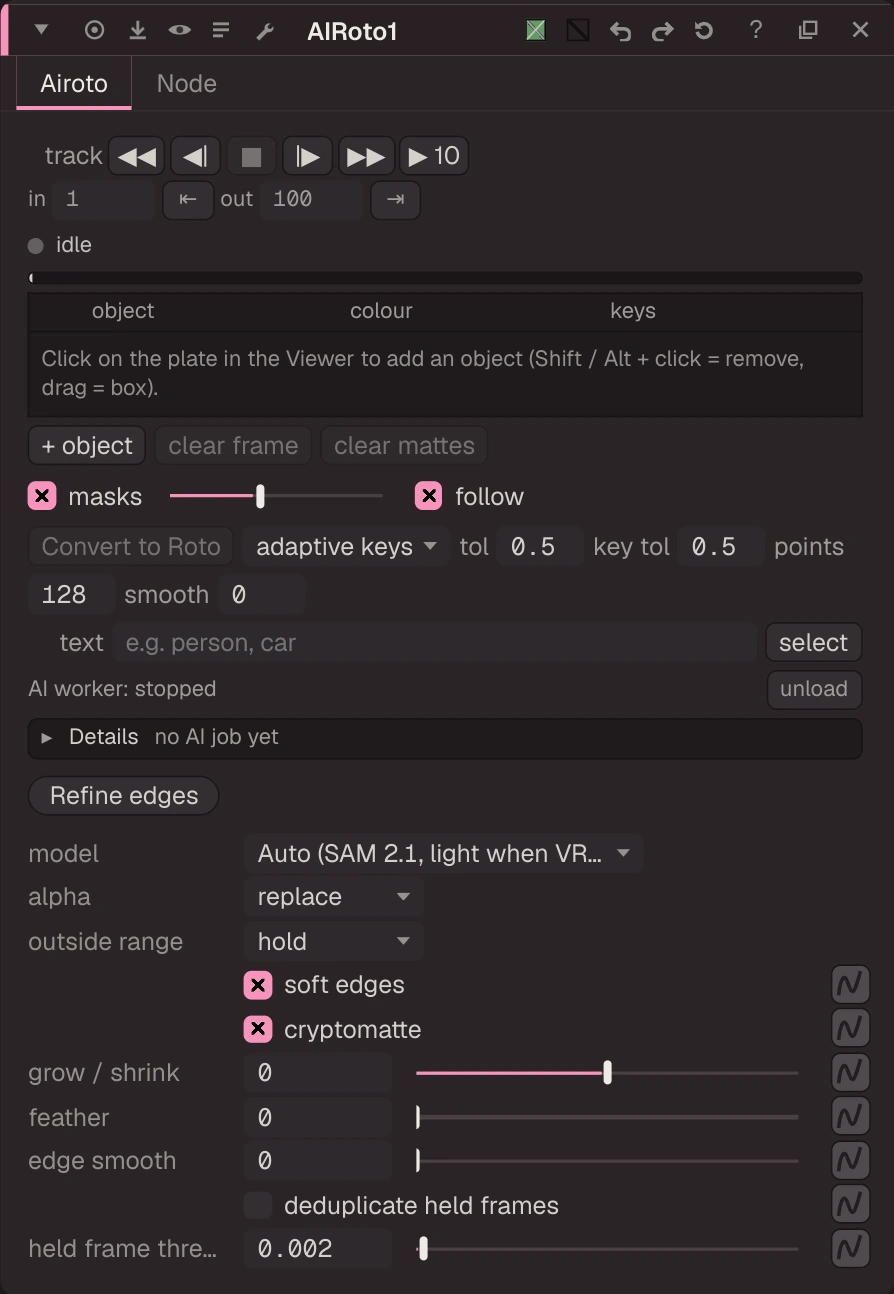
Click on the plate in the Viewer to add an object (Shift/Alt+click removes, drag draws a box); the mask shows at once.
Click on the plate in the Viewer to add an object (Shift/Alt+click removes, drag draws a box); the mask shows at once. Track from the frame you are on: Z back, X one back, C one forward, V forward (or the panel buttons), stopping at the in / out points; ■ stops and keeps the frames done. Clicks on any other frame, then tracking from there, re-track only from that frame. The state line and Details log say exactly what the AI is doing. Grow / shrink, edge smooth and feather shape the mattes and apply at once on the saved result (no model re-run); Deduplicate Held Frames reuses the matte of repeated frames (animation on 2s). Mattes go to alpha, airoto_ layers and CryptoAIRoto00. Models: Auto (SAM 2.1, or EfficientTAM-S when GPU memory is low), SAM 2.1, EfficientTAM-S / -Ti, EdgeTAM (Apache-2.0), SAM 3 / 3.1 (SAM License, text).
| Node | AIRoto |
|---|---|
| Menu | AI › AIRoto |
| Names in each format | |
| .oink comp (JSON) | "type": "OC_N_airoto" |
| .nk script | none: written as an Oink node |
| Python | nuke.createNode("OC_N_airoto") |
| Assistant (MCP) | create_node(type="AIRoto") |
| Tab search | airoto, or its initials air |
What you get / next steps
- Alpha: the output's alpha is the union of the enabled objects (
alphaknob: replace, multiply or keep the input alpha). Use it like any matte: Premult, Merge, or as the mask input of a Grade, Blur or ColorCorrect. - One layer per object:
airoto_<name>holds that object's matte in r, g, b and a. Pick it in the Viewer's layer menu, or in a node's mask channel, to grade one object only. - Cryptomatte:
CryptoAIRoto00carries an exact ID per object; a Cryptomatte node picks objects by name with Ctrl+click. - Convert to Roto (panel): makes a Roto node on the plate with one animated bezier shape per enabled object, named and coloured like the object (MaskToSpline: adaptive keys or a key on every frame, fit tolerance, smoothing). One undo step; progress in the state line and Details. Edit the splines like any Roto shape, then refine them with SmartRoto.
Inputs and outputs
| Port | Name | Type |
|---|---|---|
| input 0 | Image | image |
| output 0 | Image | image |
Knobs
Panel tab Airoto, in panel order.
| Knob | Label | Type | Default | Range / values | .nk knob | Description |
|---|---|---|---|---|---|---|
model | model | menu | AUTO | AUTO (Auto (SAM 2.1, light when VRAM is low)), SAM2 (SAM 2.1 Large), EFFICIENTTAM (EfficientTAM-S (light)), EFFICIENTTAM_TI (EfficientTAM-Ti (lightest)), EDGETAM (EdgeTAM (fast)), SAM3 (SAM 3 (text)), SAM31 (SAM 3.1 (text, multi-object)) | ||
alpha_mode | alpha | menu | REPLACE | REPLACE (replace), MULTIPLY (multiply), KEEP (keep) | ||
outside | outside range | menu | HOLD | HOLD (hold), BLACK (black) | ||
soft_edges | soft edges | bool | true | Model probability as a soft edge (off = hard 0/1) | ||
output_crypto | cryptomatte | bool | true | Add the CryptoAIRoto00 ID layer | ||
mask_grow | grow / shrink | float | 0 | -100 to 100 | Grow (> 0) or shrink (< 0) every matte by this many pixels | |
mask_feather | feather | float | 0 | 0 to 200 | Soften every matte's edge (Gaussian, px) | |
mask_smooth | edge smooth | float | 0 | 0 to 20 | Smooth jagged / boiling edges (blur then re-sharpen, px); keeps the edge position | |
dedupe | deduplicate held frames | bool | false | Detect repeated frames (animation on 2s, held frames) and reuse their matte instead of re-tracking them (no edge boil) | ||
dedupe_threshold | held frame threshold | float | 0.002 | 0 to 0.1 | Mean absolute difference (0..1 display values) under which a frame counts as a repeat of the previous one |
Other knobs (Python, .nk and the assistant; not on the panel)
| Knob | Label | Type | Default | Range / values | .nk knob | Description |
|---|---|---|---|---|---|---|
gl_color | Viewer Controls Color | float ×3 | 0, 0, 0 | 0 to 1 | ||
postage_stamp_frame | Static Frame | int | 1 | -2147483648 to 2147483647 | ||
lifetimeStart | Lifetime Start | int | 0 | -2147483648 to 2147483647 | ||
lifetimeEnd | Lifetime End | int | 100 | -2147483648 to 2147483647 | ||
useLifetime | Use Lifetime | boolean | false | |||
cached | Cached | boolean | false | |||
bookmark | Bookmark | boolean | false | |||
dope_sheet | Dope Sheet | boolean | false | |||
clone_group | Clone Group | string | ||||
link_source | Link Source | string | ||||
link_overrides | Link Overrides | string | ||||
split_views | Split Views | string | ||||
track_in | Track In | int | 0 | -2147483648 to 2147483647 | First frame Track backward goes to (0 = project first frame) | |
track_out | Track Out | int | 0 | -2147483648 to 2147483647 | Last frame Track forward goes to (0 = project last frame) | |
current_object | Current Object | int | 0 | 0 to 2147483647 | ||
text_prompt | Text | string | Text Select: what to find, e.g. 'person' or 'car. dog' | |||
objects_data | Objects | string | [] | |||
prompts_data | Prompts | string | [] | |||
results_data | Results | string | {} |
Examples
Open these from Help › Examples…, or from the ? menu in this node's Properties panel.
- AIRoto: click to roto (
examples/ai/airoto_click.oink): AIRoto (SAM 2.1) turns one click on the ball into a matte and tracks it over the sequence. Open the node, click in the Viewer on another object to add it, then press the track buttons.