CornerPin2D
Warps the image so the from1-4 corners land on to1-4.
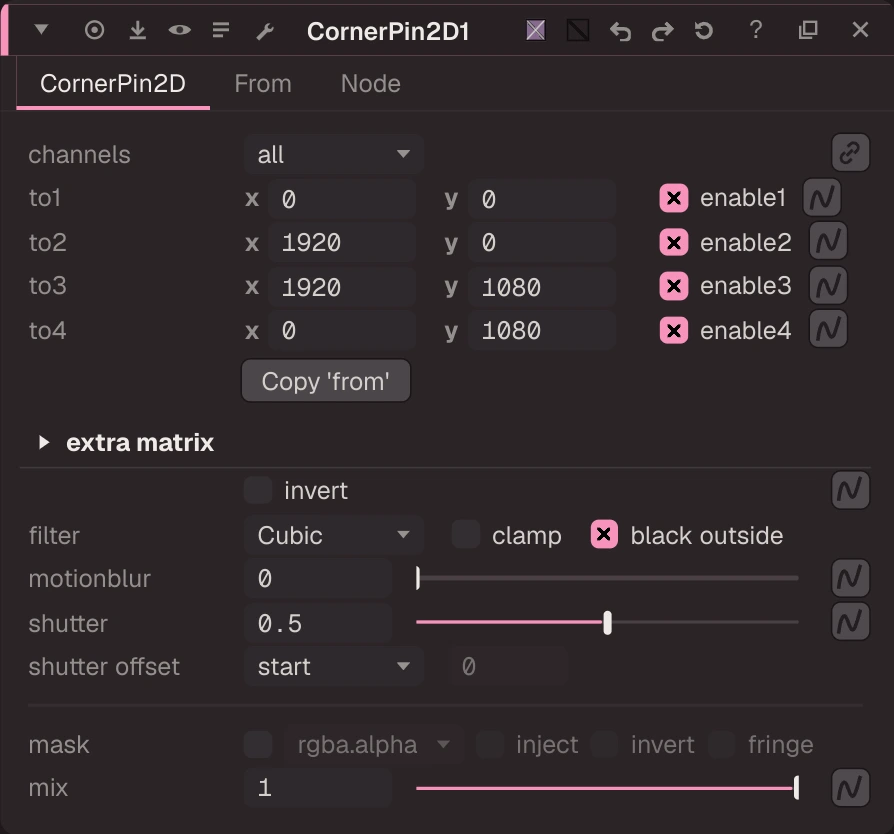
Warps the image so the from1-4 corners land on to1-4. Drag the to handles in the Viewer. Use fewer corners (enable1-4) for a simpler move. Extra matrix, invert, filter, motion blur and bounding box work as on Transform, and it joins a Transform chain into one filter. Copy "from" to "to", Copy "to" to "from" and Set "to" to input are buttons.
| Node | CornerPin2D |
|---|---|
| Menu | Transform › CornerPin2D |
| Names in each format | |
| .oink comp (JSON) | "type": "OC_N_cornerpin" |
| .nk script | CornerPin2D (how .nk import works) |
| Python | nuke.createNode("CornerPin2D") |
| Assistant (MCP) | create_node(type="CornerPin2D") |
| Tab search | cornerpin2d, or its initials cp2d |
Inputs and outputs
| Port | Name | Type |
|---|---|---|
| input 0 | Image | image |
| input 1 | mask | image |
| output 0 | Image | image |
Knobs
Panel tab CornerPin2D, in panel order.
| Knob | Label | Type | Default | Range / values | .nk knob | Description |
|---|---|---|---|---|---|---|
channels | channels | menu | all | rgba, rgb, alpha, all, none | Layer the op applies to: rgb, rgba, alpha, all, none, <layer> or <layer>.<ch> | |
to1 | to1 | vector ×2 | 0, 0 | -2000 to 6000 | to1 | |
enable1 | enable1 | bool | true | enable1 | ||
to2 | to2 | vector ×2 | 1920, 0 | -2000 to 6000 | to2 | |
enable2 | enable2 | bool | true | enable2 | ||
to3 | to3 | vector ×2 | 1920, 1080 | -2000 to 6000 | to3 | |
enable3 | enable3 | bool | true | enable3 | ||
to4 | to4 | vector ×2 | 0, 1080 | -2000 to 6000 | to4 | |
enable4 | enable4 | bool | true | enable4 | ||
copy_from | Copy 'from' | button (panel only) | ||||
transform_matrix | extra matrix | matrix ×16 | 1, 0, 0, 0, 0, 1, 0, 0, 0, 0, 1, 0, 0, 0, 0, 1 | transform_matrix | ||
invert | invert | bool | false | invert | ||
filter | filter | menu | CUBIC | IMPULSE (Impulse), CUBIC (Cubic), KEYS (Keys), SIMON (Simon), RIFMAN (Rifman), MITCHELL (Mitchell), PARZEN (Parzen), NOTCH (Notch), LANCZOS4 (Lanczos4), LANCZOS6 (Lanczos6), SINC4 (Sinc4) | filter | |
clamp | clamp | bool | false | clamp | ||
black_outside | black outside | bool | true | black_outside | ||
motionblur | motionblur | float | 0 | 0 to 4 | motionblur | |
shutter | shutter | float | 0.5 | 0 to 2 | shutter | |
shutter_offset | shutter offset | menu | START | CENTRED (centred), START (start), END (end), CUSTOM (custom) | shutteroffset | |
shutter_custom_offset | custom offset | float | 0 | -1 to 1 | shuttercustomoffset | |
mask_channel | mask | menu | none | none, rgba.alpha, rgba.red, rgba.green, rgba.blue | Mask channel, e.g. rgba.alpha (none = no mask) | |
inject | inject | bool | false | Copy the mask into mask.a for nodes downstream | ||
invert_mask | invert | bool | false | invert_mask | ||
fringe | fringe | bool | false | Only apply the effect at the edges of the mask | ||
mix | mix | float | 1 | 0 to 1 | mix | |
from1 | from1 | vector ×2 | 0, 0 | -2000 to 6000 | from1 | |
from2 | from2 | vector ×2 | 1920, 0 | -2000 to 6000 | from2 | |
from3 | from3 | vector ×2 | 1920, 1080 | -2000 to 6000 | from3 | |
from4 | from4 | vector ×2 | 0, 1080 | -2000 to 6000 | from4 | |
set_to_input | Set to input | button (panel only) | ||||
copy_to | Copy 'to' | button (panel only) |
Other knobs (Python, .nk and the assistant; not on the panel)
| Knob | Label | Type | Default | Range / values | .nk knob | Description |
|---|---|---|---|---|---|---|
gl_color | Viewer Controls Color | float ×3 | 0, 0, 0 | 0 to 1 | ||
postage_stamp_frame | Static Frame | int | 1 | -2147483648 to 2147483647 | ||
lifetimeStart | Lifetime Start | int | 0 | -2147483648 to 2147483647 | ||
lifetimeEnd | Lifetime End | int | 100 | -2147483648 to 2147483647 | ||
useLifetime | Use Lifetime | boolean | false | |||
cached | Cached | boolean | false | |||
bookmark | Bookmark | boolean | false | |||
dope_sheet | Dope Sheet | boolean | false | |||
clone_group | Clone Group | string | ||||
link_source | Link Source | string | ||||
link_overrides | Link Overrides | string | ||||
split_views | Split Views | string | ||||
unpremult | (Un)premult by | enum | none | none, rgba.alpha | ||
invert_unpremult | invert | boolean | false | (Un)premultiply by 1 - alpha |
Knob names in .nk scripts
| .nk knob | Knob here |
|---|---|
shutteroffset | shutter_offset |
shuttercustomoffset | shutter_custom_offset |
Other .nk knobs use the same name here. See .nk import.
Examples
Open these from Help › Examples…, or from the ? menu in this node's Properties panel.
- CornerPin a photo onto a plate (
examples/transform/cornerpin.oink): CornerPin maps the four corners of the source (from1-4) to four points (to1-4). The pinned photo is merged over another plate, like a screen replacement. - Tracker to CornerPin (
examples/transform/tracker_cornerpin.oink): Four points tracked on a moving plate, exported as an animated CornerPin that carries a text patch along with the move.